
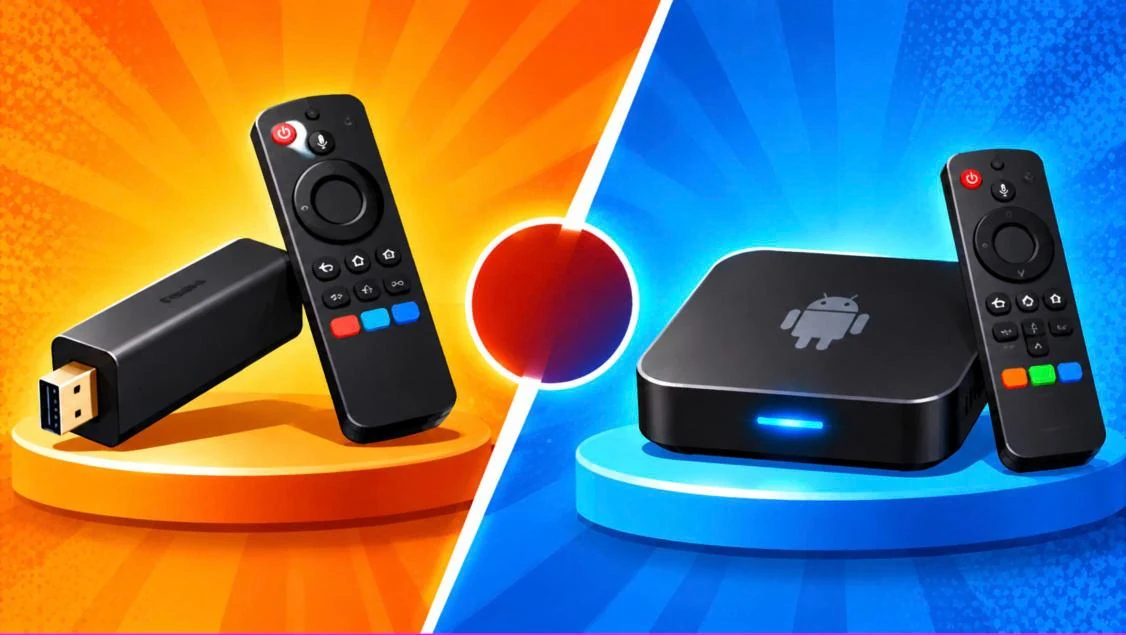
For IPTV, an Android TV box generally beats a Firestick on performance and connectivity — more power, more memory and a built-in Ethernet port — while the Firestick wins on price and portability. Both run the same top IPTV apps, so the right choice comes down to how and where you watch. This guide compares Android boxes and Firesticks for IPTV across price, performance, connectivity, apps and portability, so you can pick the better fit for your setup.
Key takeaways
- Android box: more power, more memory, built-in Ethernet — better for a main TV and big channel lists.
- Firestick: cheaper and portable — great for a second TV or travel.
- Both run TiviMate and IPTV Smarters; the box installs from the Play Store, the Firestick sideloads.
- For a main living-room IPTV setup, an Android box is usually the better long-term choice.
Quick verdict
If you want the best IPTV experience on your main TV — smooth navigation of a large channel list, reliable 4K, and a wired connection — an Android TV box is the better choice. If you want the cheapest way in, a portable device for a second TV, or something to travel with, the Firestick is excellent value. Neither is “wrong”; they suit different priorities, and plenty of households use both. The sections below explain the trade-offs so you can match one to your needs.
Price
The Firestick wins clearly on price. A standard Firestick is one of the cheapest ways to get IPTV onto a TV, and even the 4K Max is inexpensive. Android TV boxes range from budget units priced similarly to a Firestick up to premium models costing considerably more. At the very low end they’re comparable, but a genuinely good Android box — one worth buying over a Firestick — costs more than a standard Firestick. So if upfront cost is your main concern, the Firestick is hard to beat; if you’re willing to spend a bit more for performance, a box earns it.
Performance
This is where Android boxes pull ahead. A good box typically has a faster processor and more RAM than a Firestick, which shows up most when scrolling very large channel lists and playing high-bitrate 4K streams — exactly the demands of serious IPTV use. Budget Firesticks can feel sluggish on huge lineups, and even the 4K Max, while capable, has limited memory. For a main TV where you watch a lot of live content, the box’s extra headroom means a smoother, more responsive experience that holds up better over time. For casual use, the difference is smaller.
Connectivity
Connectivity is a decisive factor for IPTV, and here the Android box has a built-in advantage: most boxes include an Ethernet port, letting you wire directly to your router for the stable connection live TV needs. A Firestick relies on Wi-Fi unless you add a separate Ethernet adapter. Since a wired connection is the single most effective way to prevent buffering, the box’s built-in port is a real plus for a main setup — though a Firestick with an inexpensive Ethernet adapter closes the gap. If you can only use Wi-Fi, both depend on signal strength.
Apps and setup
Both run the same leading IPTV apps — TiviMate, IPTV Smarters and others — but they install differently. On an Android box, you get apps straight from the Google Play Store, which is simpler. On a Firestick, the popular IPTV players aren’t in Amazon’s store, so you sideload them via the Downloader app after enabling unknown sources — an easy process, but an extra step. Our Android TV box guide and Firestick guide cover each setup. Functionally the apps are identical once installed.
Portability
The Firestick’s trump card is portability. It’s tiny, plugs into any TV’s HDMI port, and is easy to take to a hotel, cottage or friend’s place — just connect it to the available Wi-Fi and your setup travels with you. An Android box is larger, usually needs a power outlet and often a wired connection, so it’s more of a fixed living-room device. If you want IPTV you can carry around, the Firestick is the clear winner; if it lives permanently by one TV, the box’s size doesn’t matter.
Side-by-side comparison
| Factor | Android TV box | Firestick |
|---|---|---|
| Price | Budget to premium | Cheapest |
| Performance | Faster, more RAM | Good; budget models can lag |
| Ethernet | Usually built in | Needs an adapter |
| App install | Play Store (direct) | Sideload via Downloader |
| Portability | Fixed device | Very portable |
| Best for | Main TV, heavy use | Second TV, travel, budget |
Which should you choose?
Choose an Android box if it’s your main TV, you watch a lot of live sport or big channel lists, you want a wired connection, and you’re happy to spend a little more for a smoother, longer-lasting experience. Choose a Firestick if you want the cheapest entry, a device for a second TV, or something portable for travel. Many households sensibly do both — a box on the main TV and Firesticks on secondary ones — since your subscription works across all of them. Our IPTV box guide covers the wider range of devices.
Longevity and value over time
Beyond the upfront price, it’s worth thinking about how long each device stays good. Cheap Firesticks and bottom-end Android boxes can start to feel sluggish within a year or so as apps grow heavier, while a decent mid-range Android box tends to stay responsive for several years. That changes the value calculation: a slightly pricier box that lasts three or four years can be better value than replacing a cheap device repeatedly. The 4K Max Firestick sits in between — more capable than the standard stick and reasonably durable. If you want the lowest possible cost right now, the Firestick wins; if you want the best value over time for a main TV, a quality Android box often works out cheaper in the long run and more pleasant to use throughout. Either way, because the box or stick is separate from your subscription, upgrading later is painless — you just sign in on the new device.
The remote and everyday experience
A detail that’s easy to overlook is the remote and day-to-day feel. The Firestick’s remote is simple and includes Alexa voice search, which is handy, though it’s designed around Amazon’s interface. Many Android boxes — especially IPTV-focused ones like Formuler and BuzzTV — ship with remotes designed with live-TV navigation in mind, sometimes with number keys and shortcuts that make flipping channels feel more like traditional TV. For heavy live-TV viewers, that can genuinely improve the experience. It’s not a dealbreaker either way, but if you watch a lot of live channels and value quick, cable-like navigation, an IPTV-oriented box’s remote is a small but real advantage over the Firestick’s streaming-first design.
Our recommendation by household
To make it concrete: a sports-first or heavy live-TV household is best served by a good Android box on the main TV, wired by Ethernet, for the smoothest experience. A budget-conscious or casual viewer will be very happy with a Firestick 4K, which does the core job for less. A multi-room household ideally uses a box on the primary TV and Firesticks on the others, balancing performance where it matters with cost where it doesn’t. And a traveller or renter who moves often will appreciate the Firestick’s portability above all. Match the device to your situation rather than chasing a single “best,” and you’ll get the most for your money — the right answer genuinely differs from one household to the next.
Bottom line
For IPTV, an Android TV box is the better performer — more power and a built-in Ethernet port make it ideal for a main TV — while the Firestick wins on price and portability for a second screen or travel. Both run the same apps and the same subscription, so there’s no wrong answer, only the right fit for how you watch. To test a service on whichever you choose, TVNow offers a 24-hour free trial.
Frequently asked questions
Is an Android box or Firestick better for IPTV?
An Android box generally performs better for a main TV — more power and a built-in Ethernet port — while a Firestick is cheaper and more portable.
Do both run the same IPTV apps?
Yes — both run TiviMate, IPTV Smarters and others. The box installs them from the Play Store; the Firestick sideloads them via Downloader.
Does the Firestick have Ethernet?
Not built in — you need an inexpensive Ethernet adapter. Most Android boxes include an Ethernet port.
Which is cheaper?
The Firestick, especially the standard model. Good Android boxes cost more, though budget boxes are comparable.
Can I use both?
Yes — many people put a box on the main TV and Firesticks on secondary TVs. Your subscription works across devices, up to its connection limit.
Which is better for 4K and big channel lists?
An Android box, thanks to its faster processor and more memory. Budget Firesticks can lag on large lineups.